Bringing coding bots into your classroom is a fun and engaging way to get students excited about programming. If you’ve ever wondered why coding matters for young learners, check out my post “My Favorite Coding Apps for Kids” for a deeper dive into the “why” behind early programming.
In short: introducing programming at a young age gives students the foundational skills they’ll need in the future. It supports higher-order thinking and helps kids develop logical, step-by-step problem-solving abilities. When used with younger students, coding tools can help build early connections that will serve them later when concepts become more complex.
Why Coding Bots Work So Well in Primary Grades
Getting young students to engage in critical thinking can sometimes feel like a challenge—but this is where coding bots shine! The moment you hand a student a bot, they’re naturally curious and eager to figure it out. Without even realizing it, they’re using problem-solving, creativity, and math skills—and they’re having fun doing it.
Coding bots make abstract concepts concrete. They provide hands-on practice with sequencing, cause and effect, and trial-and-error thinking. Plus, they’re a hit during centers, STEM stations, or even indoor recess.

My Favorite Coding Bots for Young Learners
1. Dash and Dot (by Wonder Workshop)
Perfect for students ages 6+, Dash and Dot are a dynamic duo that turn coding into play.
- Dot comes in a Creativity Kit with stickers and LEGO connectors, so students can design and personalize their bot.
- Dash can draw, build, and even launch balls at targets.
- Both bots work with apps that allow students to program movements and reactions.
Pricing: Dot starts at around $80, and Dash is around $150.
🛒 Buy them here

2. Botley the Coding Robot (by Learning Resources)
No screen required—Botley is ready to go right out of the box and is designed for ages 5+.
- Comes with mazes, puzzles, and games that encourage creative problem solving.
- Teaches coding concepts like algorithms, loops, and debugging.
- Free lesson plans are available online to help you integrate Botley into your curriculum.
Pricing: A full classroom set starts at $300.
3. Code & Go Robot Mouse
Meet Jack the Robot Mouse—an affordable and colorful option for early coders.
- Jack lights up, makes sounds, and moves at two speeds.
- Kids can program him using color-coded buttons that match activity cards.
- Pairs well with the STEM Robot Mouse Coding Activity Set for extended learning.
Pricing: Starts at $30.

4. Ozobot Evo
The Evo is a tiny 1-inch bot that packs in a lot of power for both screen-free and digital learning.
- Use markers and paper for color-coding (great for beginners).
- On-screen coding is available via tablet or computer with 5 levels of difficulty.
- Easily individualize instruction by selecting the right level for each student.
Pricing: Educator Entry Kit starts at $100.
Full classroom bundle is around $1,500.
🛒 Buy here
Keeping It Simple: Organizing Your Classroom Bots
Let’s be real—teachers don’t have time for tools that are complicated to set up or store. If we want our coding bots to actually get used, they have to be easy to access and quick to organize.
Here’s how I keep my bots classroom-ready:
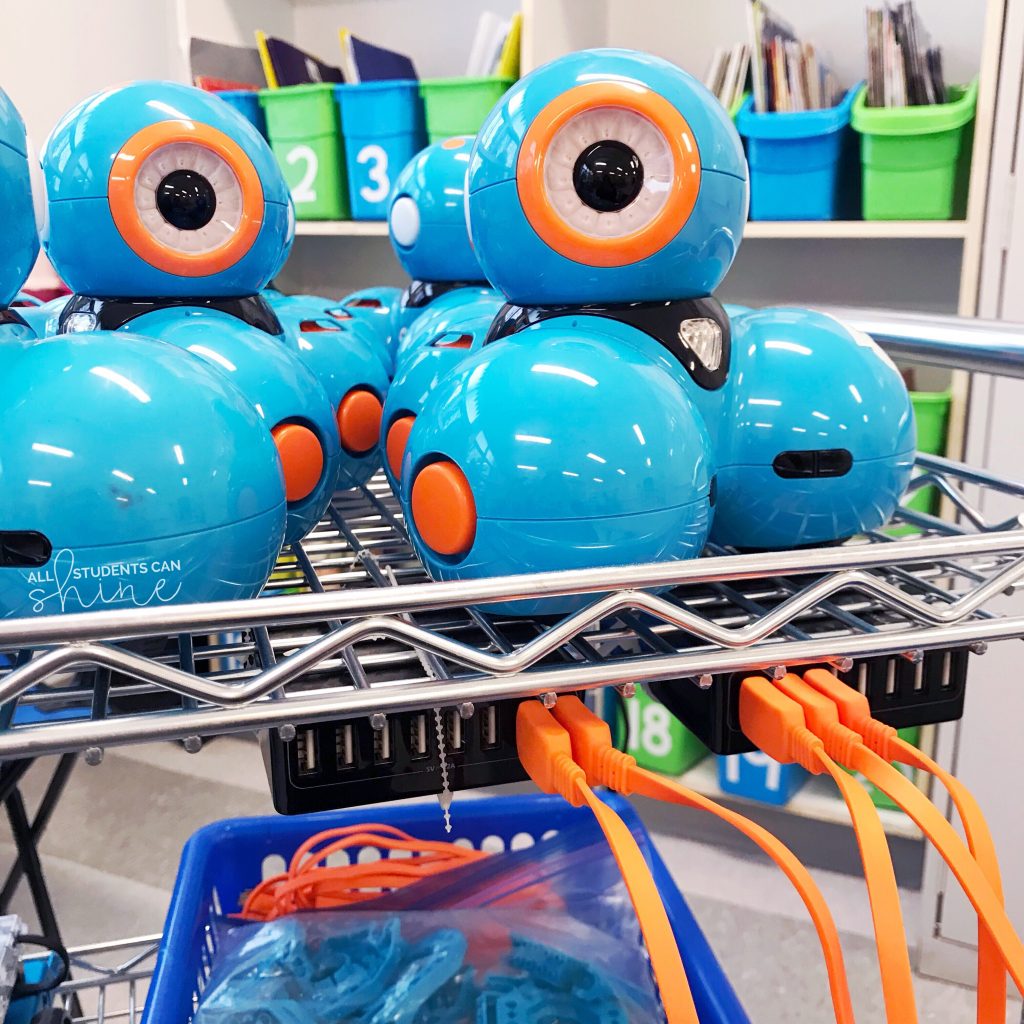
- I repurposed a simple Amazon cart into a mobile charging station by zip-tying charging docks to the frame.
- Everything moves easily from classroom to classroom, and cords stay in place.
This one change made a huge difference in making our bots more accessible and teacher-friendly.

How to Choose the Right Bot for Your Classroom
Before you invest, ask yourself:
- Do I want one or two bots for small groups or enough for the whole class?
- Will students use them during centers, whole-group lessons, or as a station?
- Do I need screen-free options?
Some bots offer bundles specifically for classroom use, while others are single units. Start small if needed—you don’t need a full class set to start coding with your students!
Tell Me: What Bots Do Your Students Love?
I’d love to hear about your classroom coding adventures.
Follow me on Facebook and Instagram, and let me know which bots your students are obsessed with.
Let’s keep inspiring a new generation of thinkers—one bot at a time.